| View previous topic :: View next topic |
| Author |
Message |
Serge
Professional Member


Joined: 04 Mar 2002
Posts: 1480
Location: Australia
|
 Posted: Fri Apr 25, 2003 11:13 pm Post subject: icon editor Posted: Fri Apr 25, 2003 11:13 pm Post subject: icon editor |
 |
|
hi all,
i recently came across a great free icon editor...the things i like about this one are: i can type in text as text and it is placed in there for me, i can do copy and paste of icon sections, and even move sections of the icon
the program also enables you to make ani files very very easily...and you can save several icons in the same icon file...and you can import pictures to change into icons...and you can make your own cursors...and more...
i highly recommend this little free gem 
check it out at www.conware.org and look for IconArt
Serge
_________________
Last edited by Serge on Sat Apr 26, 2003 6:11 am; edited 1 time in total |
|
| Back to top |
|
 |
Aslan
Valued Contributor


Joined: 31 May 2001
Posts: 589
Location: Memphis, TN USA
|
| Posted: Sat Apr 26, 2003 1:11 am Post subject: |
|
|
The link goes to a German (I think) page that sells computer parts. I found no reference to IconArtist.
However, I did find it using GOOGLE and came up with this.
http://geneschulze.org/sr/Programs/IconArtist.zip
I costs $5 US |
|
| Back to top |
|
|
Serge
Professional Member
Joined: 04 Mar 2002
Posts: 1480
Location: Australia
|
| Posted: Sat Apr 26, 2003 6:15 am Post subject: |
|
|
sorry about that aslan...i made 2 mistakes (1) the web address and (2) the name of the program
i have amended my first post and it's now correct
sorry about that
Serge
_________________
|
|
| Back to top |
|
|
Aslan
Valued Contributor
Joined: 31 May 2001
Posts: 589
Location: Memphis, TN USA
|
| Posted: Sat Apr 26, 2003 1:39 pm Post subject: |
|
|
Nice little app Serge  |
|
| Back to top |
|
|
FreezingFire
Admin Team

Joined: 23 Jun 2002
Posts: 3508
|
| Posted: Sat Apr 26, 2003 1:54 pm Post subject: |
|
|
Nice Serge! 
Does this one do Hi-Res icons? Currently I'm using free utilities from
http://www.PCMag.com/utilities/ called "IconEdit32" and "CursorDance"
which enables me to make icons and ANI files. 
_________________
FreezingFire
VDSWORLD.com
Site Admin Team |
|
| Back to top |
|
|
Skit3000
Admin Team

Joined: 11 May 2002
Posts: 2166
Location: The Netherlands
|
|
| Back to top |
|
|
FreezingFire
Admin Team
Joined: 23 Jun 2002
Posts: 3508
|
| Posted: Sat Apr 26, 2003 3:13 pm Post subject: |
|
|
The following structure illustrates the entire format of an ICO (or CUR)
file:
| Code: | typedef struct _IconFile
{
WORD Reserved; /* Reserved (always 0) */
WORD ResourceType; /* Resource ID (always 1) */
WORD IconCount; /* Number of icon bitmaps in file */
ICONENTRY IconDir[]; /* Directory of icon entries */
ICONDATA IconData[]; /* Listing of ICO bitmaps */
} ICONFILE; |
This was taken from a great resource I found on icons:
http://www.iconolog.net/info/icoFormat.html
That would be really cool to make an icon editor in VDS.
Garrett has an example listed on VDSWORLD called "GradioSpheres".
This uses an icon that is extracted using BINFILE. You can download
it here:
http://www.vdsworld.com/index.php?page=download&fileid=263
The code for the icon from the example is as follows:
| Code: | BINFILE OPEN,1,@path(%0)blank.cur,WRITE
BINFILE WRITE,1,HEX,00 00 01 00 01 00 20 20 10 00 00 00 00 00 E8 02
BINFILE WRITE,1,HEX,00 00 16 00 00 00 28 00 00 00 20 00 00 00 40 00
BINFILE WRITE,1,HEX,00 00 01 00 04 00 00 00 00 00 80 02 00 00 00 00
BINFILE WRITE,1,HEX,00 00 00 00 00 00 10 00 00 00 00 00 00 00 00 00
BINFILE WRITE,1,HEX,00 00 00 00 80 00 00 80 00 00 00 80 80 00 80 00
BINFILE WRITE,1,HEX,00 00 80 00 80 00 80 80 00 00 C0 C0 C0 00 80 80
BINFILE WRITE,1,HEX,80 00 00 00 FF 00 00 FF 00 00 00 FF FF 00 FF 00
BINFILE WRITE,1,HEX,00 00 FF 00 FF 00 FF FF 00 00 FF FF FF 00 00 00
BINFILE WRITE,1,HEX,00 00 00 00 00 00 00 00 00 00 00 00 00 00 00 00
BINFILE WRITE,1,HEX,00 00 00 00 00 00 00 00 00 00 00 00 00 00 00 00
BINFILE WRITE,1,HEX,00 00 00 00 00 00 00 00 00 00 00 00 00 00 00 00
BINFILE WRITE,1,HEX,00 00 00 00 00 00 00 00 00 00 00 00 00 00 00 00
BINFILE WRITE,1,HEX,00 00 00 00 00 00 00 00 00 00 00 00 00 00 00 00
BINFILE WRITE,1,HEX,00 00 00 00 00 00 00 00 00 00 00 00 00 00 00 00
BINFILE WRITE,1,HEX,00 00 00 00 00 00 00 00 00 00 00 00 00 00 00 00
BINFILE WRITE,1,HEX,00 00 00 00 00 00 00 00 00 00 00 00 00 00 00 00
BINFILE WRITE,1,HEX,00 00 00 00 00 00 00 00 00 00 00 00 00 00 00 00
BINFILE WRITE,1,HEX,00 00 00 00 00 00 00 00 00 00 00 00 00 00 00 00
BINFILE WRITE,1,HEX,00 00 00 00 00 00 00 00 00 00 00 00 00 00 00 00
BINFILE WRITE,1,HEX,00 00 00 00 00 00 00 00 00 00 00 00 00 00 00 00
BINFILE WRITE,1,HEX,00 00 00 00 00 00 00 00 00 00 00 00 00 00 00 00
BINFILE WRITE,1,HEX,00 00 00 00 00 00 00 00 00 00 00 00 00 00 00 00
BINFILE WRITE,1,HEX,00 00 00 00 00 00 00 00 00 00 00 00 00 00 00 00
BINFILE WRITE,1,HEX,00 00 00 00 00 00 00 00 00 00 00 00 00 00 00 00
BINFILE WRITE,1,HEX,00 00 00 00 00 00 00 00 00 00 00 00 00 00 00 00
BINFILE WRITE,1,HEX,00 00 00 00 00 00 00 00 00 00 00 00 00 00 00 00
BINFILE WRITE,1,HEX,00 00 00 00 00 00 00 00 00 00 00 00 00 00 00 00
BINFILE WRITE,1,HEX,00 00 00 00 00 00 00 00 00 00 00 00 00 00 00 00
BINFILE WRITE,1,HEX,00 00 00 00 00 00 00 00 00 00 00 00 00 00 00 00
BINFILE WRITE,1,HEX,00 00 00 00 00 00 00 00 00 00 00 00 00 00 00 00
BINFILE WRITE,1,HEX,00 00 00 00 00 00 00 00 00 00 00 00 00 00 00 00
BINFILE WRITE,1,HEX,00 00 00 00 00 00 00 00 00 00 00 00 00 00 00 00
BINFILE WRITE,1,HEX,00 00 00 00 00 00 00 00 00 00 00 00 00 00 00 00
BINFILE WRITE,1,HEX,00 00 00 00 00 00 00 00 00 00 00 00 00 00 00 00
BINFILE WRITE,1,HEX,00 00 00 00 00 00 00 00 00 00 00 00 00 00 00 00
BINFILE WRITE,1,HEX,00 00 00 00 00 00 00 00 00 00 00 00 00 00 00 00
BINFILE WRITE,1,HEX,00 00 00 00 00 00 00 00 00 00 00 00 00 00 00 00
BINFILE WRITE,1,HEX,00 00 00 00 00 00 00 00 00 00 00 00 00 00 00 00
BINFILE WRITE,1,HEX,00 00 00 00 00 00 00 00 00 00 00 00 00 00 00 00
BINFILE WRITE,1,HEX,00 00 00 00 00 00 00 00 00 00 00 00 00 00 FF FF
BINFILE WRITE,1,HEX,FF FF FF FF FF FF FF FF FF FF FF FF FF FF FF FF
BINFILE WRITE,1,HEX,FF FF FF FF FF FF FF FF FF FF FF FF FF FF FF FF
BINFILE WRITE,1,HEX,FF FF FF FF FF FF FF FF FF FF FF FF FF FF FF FF
BINFILE WRITE,1,HEX,FF FF FF FF FF FF FF FF FF FF FF FF FF FF FF FF
BINFILE WRITE,1,HEX,FF FF FF FF FF FF FF FF FF FF FF FF FF FF FF FF
BINFILE WRITE,1,HEX,FF FF FF FF FF FF FF FF FF FF FF FF FF FF FF FF
BINFILE WRITE,1,HEX,FF FF FF FF FF FF FF FF FF FF FF FF FF FF FF FF
BINFILE WRITE,1,HEX,FF FF FF FF FF FF FF FF FF FF FF FF FF FF
BINFILE CLOSE,1 |
_________________
FreezingFire
VDSWORLD.com
Site Admin Team |
|
| Back to top |
|
|
Skit3000
Admin Team
Joined: 11 May 2002
Posts: 2166
Location: The Netherlands
|
|
| Back to top |
|
|
Garrett
Moderator Team
Joined: 04 Oct 2001
Posts: 2149
Location: A House
|
| Posted: Sat Apr 26, 2003 7:14 pm Post subject: |
|
|
I have an interface already made for an icon editor if you want. It's
similar to the icon editor interface that comes with VDS.
-Garrett |
|
| Back to top |
|
|
Serge
Professional Member
Joined: 04 Mar 2002
Posts: 1480
Location: Australia
|
| Posted: Sun Apr 27, 2003 12:55 am Post subject: |
|
|
hi ff,
you can make icons in 16x16, 32x32, 48x48 and 64x64...and using 16 or 256 or full colour...does that answer your question?...give it a try
Serge
_________________
|
|
| Back to top |
|
|
FreezingFire
Admin Team
Joined: 23 Jun 2002
Posts: 3508
|
| Posted: Sun Apr 27, 2003 1:19 pm Post subject: |
|
|
Sorry, I made a mistake. 
I meant true color not high resolution in that first post. I assume full color
means true color?
I'm going to download that today and give it a try.
_________________
FreezingFire
VDSWORLD.com
Site Admin Team |
|
| Back to top |
|
|
FreezingFire
Admin Team
Joined: 23 Jun 2002
Posts: 3508
|
| Posted: Sun Apr 27, 2003 3:32 pm Post subject: |
|
|
| Quote: | I have an interface already made for an icon editor if you want. It's
similar to the icon editor interface that comes with VDS.
-Garrett |
I recommend an interface that is similiar to the following:
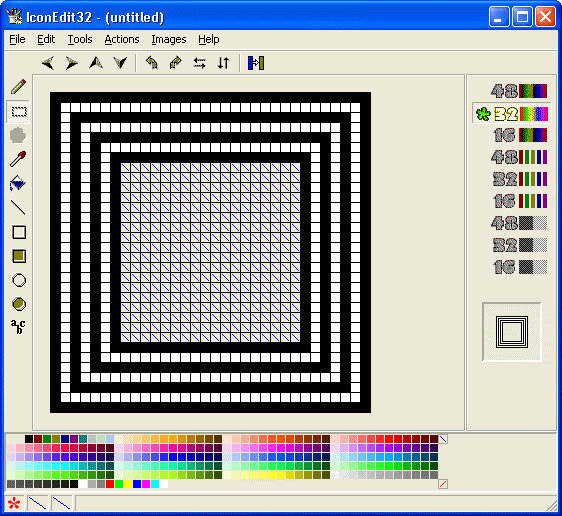
I don't know if this is going to be possible in VDS 4 but with VDS 5's
ability to load non-VDS DLL's it could be possible.
_________________
FreezingFire
VDSWORLD.com
Site Admin Team |
|
| Back to top |
|
|
Skit3000
Admin Team
Joined: 11 May 2002
Posts: 2166
Location: The Netherlands
|
|
| Back to top |
|
|
FreezingFire
Admin Team
Joined: 23 Jun 2002
Posts: 3508
|
| Posted: Sun Apr 27, 2003 4:08 pm Post subject: |
|
|
| Skit3000 wrote: | I only have to find a way to write the icon to screen &
the screen into the icon... |
Which is probably something that needs a DLL. VDS 5 will probably allow
this.
The utility I mentioned, IconEdit32, at http://www.pcmag.com/utilities/
comes with Delphi source code. That could help if you know Delphi at
all.
_________________
FreezingFire
VDSWORLD.com
Site Admin Team |
|
| Back to top |
|
|
Skit3000
Admin Team
Joined: 11 May 2002
Posts: 2166
Location: The Netherlands
|
| Posted: Sun Apr 27, 2003 4:42 pm Post subject: |
|
|
It can be done, by something like this:
| Code: |
DIALOG CREATE,Iconizer... :-),-1,0,396,325
REM *** Modified by Dialog Designer on 26-4-2003 - 19:44 ***
DIALOG ADD,STYLE,STYLE1,,,,FF8000,
DIALOG ADD,STYLE,STYLE2,,,,000000,
DIALOG ADD,GROUP,GROUP1,6,190,150,165,Colors
%x = 1
repeat
%z = 1
repeat
DIALOG ADD,TEXT,"X"%x"Z"%z,@fadd(5,@prod(%x,5)),@fadd(10,@prod(%z,5)),5,5,,,CLICK,STYLE1
%z = @succ(%z)
until @equal(%z,33)
%x = @succ(%x)
until @equal(%x,33)
DIALOG SHOW
:Clickloop
wait event
%%event = @event()
if @equal(%%event,CLOSE)
exit
end
%%clickevent = @substr(%%event,1,@pred(@pos(CLICK,%%event)))
dialog remove,%%clickevent
%x = @substr(%%clickevent,@succ(@pos(X,%%clickevent)),@pred(@pos(Z,%%clickevent)))
%y = @substr(%%clickevent,@succ(@pos(Z,%%clickevent)),@len(%%clickevent))
dialog add,TEXT,%%clickevent,@fadd(5,@prod(%x,5)),@fadd(10,@prod(%y,5)),5,5,,,CLICK,STYLE2
goto Clickloop
|
I'm still working on it, but I think it takes too long to read / write a file to the screen...
_________________
[ Add autocomplete functionality to your VDS IDE windows! ]
Voor Nederlandse beginners met VDS: bekijk ook eens deze tutorial! |
|
| Back to top |
|
|
|
|
You cannot post new topics in this forum
You cannot reply to topics in this forum
You cannot edit your posts in this forum
You cannot delete your posts in this forum
You cannot vote in polls in this forum
You can attach files in this forum
You can download files in this forum
|
|

 FAQ
FAQ Search
 Memberlist
 Usergroups
 Register
 Profile
 Log in to check your private messages
 Log in


 @vdsworld